Posts

Discovering Recyclebank.com

Image
On my personal blog I recently shared a few eco-loves of mine.   I discovered an eco website that I thought you would really enjoy called Recyclebank . I think you’re going to love the site…especially the perks they offer. To put it quite simply, you get eco-educated in exchange for Recyclebank points that are easily redeemed for free products and services. Trust me, the freebies are worth it.   Great discounts at restaurants and stores, plus totally free products and services.   Think InStyle magazine and $15 off purchases of $30 at vine.com, to name a few. The beauty of Recyclebank is that the eco-education you get (whether well-intended or simply to earn discounts) starts to have a measurable impact on your life and the choices you make.   Speaking for myself personally, Recyclebank has truly elevated how eco-conscious I am as I go about my routine.   I am delighted that the information I’ve read on the site is actually impacting my day-to-day activities a...

Featured App: iFontMaker (via Brit + Co)

Image
I recently came across the Brit + Co and fell in love! If you haven't visited, here's a snippet from their "About" page regarding what to expect: Started by Brit Morin, Brit + Co. is a lifestyle brand that provides the digital generation with savvy shortcuts for their online and offline lives. The Brit + Co blog was an immediate add to my Feedly reader.  The screengrab below captures the fun over on her blog...everything from apps to gift wrap in one place.  In today's post, I wanted to share an app with you that was just featured over at Brit + Co, just in case you aren't a reader over there yet.  The font is called iFontMaker , and it allows you to turn your own handwriting into a font in a matter of minutes.  I've had a love-hate relationship with typography for years...recognizing the power it holds but not always being able to harness it well! In the past year, I've given myself permission to experiment with typography a bit more, and have eve...

My Favorite Wordpress Quiz Plugin: SlickQuiz

Image
Quizzes are a great way to engage your audience and educate them on a topic without sharing a long list of pointers.   I recently found myself with the need to create a simple online quiz.   I started with Googling a “free quiz maker” and other similar phrases, only to find myself unhappy with the options.   Most of what I found was geared towards the educational field or appeared to be “free” but not without slapping ugly ads on my quiz.   I just needed a simple interactive quiz that allowed visitors to test their knowledge and immediately see if their responses were correct.   Google Docs provided quiz capabilities, but no way to easily show the answers in real-time as a visitor moved through the quiz. I didn’t need to store results or generate reports based on the responses. I’d forgotten for a moment that I was working within Wordpress! One of my favorite things about Wordpress is the vast pool of plugins offered to enhance your website or blog.   Surel...

unaboutique

unaboutique

Test Driving Feedly and Google Reader

Image
In today's post, I'm sharing the process of creating Google Reader and Feedly accounts. I have to tell you, I think you're really going to like Feedly! If you already have a Google Reader account, simply visit Feedly.com and sync your accounts.  Then, download the Feedly app if you wish.  If you're an iGoogle user like myself, I've outlined the process below and shared my thoughts on the Feedly interface. In the process of finding a replacement reader for iGoogle, I knew I needed to first create a Google Reader account.  I wanted to bring over all my iGoogle feeds via an import instead of manually adding each one (I had more than 70).   Thankfully, the steps outlined here worked like a charm, and in only a matter of minutes.      Next, it was time for me to sync my new Feedly account with my Google Reader account.   I suppose you could stop at Google Reader, but I was not happy with the design/layout.   I wanted something that was be...

Time to Replace iGoogle with New Reader Service

Image
If you're a longtime reader, you already know how much I enjoy reading through my favorite blog feeds on iGoogle . At the time of this post, I have close to 75 blog feeds aggregated on my iGoogle page , allowing me to quickly scan the "headlines" (latest posts) and dive further to read a preview or the full post. The recent announcement by Google that they will be retiring iGoogle effective November 1, 2013 has prompted me to find a replacement for the service.  I've looked before, because browsing my favorite blogs via iGoogle on my iPhone is sometimes wonky (turns out they had an iGoogle app that has since been retired). Now I'm in the market for an RSS aggregator that works/displays as beautifully on a mobile device as it does on my computer screen.  In reading this post about the best free RSS readers, it looks like I should test drive Feedly and create a Google Reader (different than iGoogle) account.   Since browsing my feeds on my iPhone is something I...

Hootsuite’s New Auto Scheduling Feature

Image
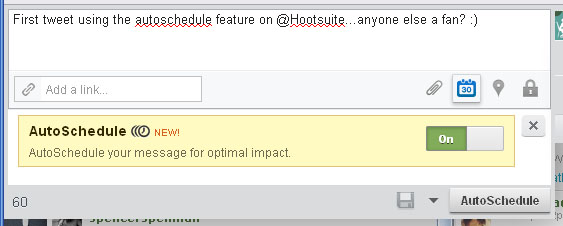
I don’t know about you, but fall is the busiest time of year in our house! That means less time to spend on Twitter, Facebook, my blogs, etc.   That said, there are many tools available online to keep your online presence going when you are running around town or jet setting (smile). Hootsuite has been a longtime favorite of mine…they offered Facebook business page scheduling before Facebook even offered it! I also like that their dashboard allows you to post to Twitter and Facebook at the same time or separately, sending in real-time or scheduling in advance.   Hootsuite has a new feature called AutoScheduling (no space) that I just had to check out for you. Super simple…I’ll break it down for you below. How to Use Hootsuite's AutoScheduling Feature: Compose your tweet or status update as usual. Click on the scheduling icon (it looks like a calendar). Change “off” to “on” in the “AutoScheduling” box. Click “autoschedule”. What happens next? How far apart w...