Posts

Showing posts with the label Design

Featured App: What the Font

Image
It’s time for another fun “featured app” review.  I kicked the series off with a review of Diptic ( here in case you missed it).  Today’s app has a clever name that is easy to remember: “What the Font”.  A little sassy, sure.  Name of app : What the Font How I heard about it: Mandi and Sarah Katherine of the Columbia CVB – some of the nicest and most knowledgeable gals you’ll ever meet. About the app : What the Font helps you identify the fonts used on just about anything.  All you have to do is snap a picture of the unknown font and upload it via your iPhone.  The app then searches its database (powered by myfonts.com) and returns a variety of matches.  What I love most: All the time I’m saving! And being able to snap photos of “old” printed pieces (even records) with a good chance their handy system will find a close match! Cost of app: Free (at the time of this post).  Look for it in the App store.  Not an iPhone user? Not to worry. ...

How to Create A WordPress.com Blog or Website in 12 Easy Steps

Image
I built a website/blog using WordPress.com recently. In this post, I will talk about the reasons I chose to use WordPress.com, as well as the process you can follow to create and customize your own WordPress.com blog. The WordPress.com Website/Blog I Created If you are a regular reader of this blog, you know I try to build & maintain a working knowledge of the most popular/widely used online website building/blogging services available online…some are free, others are paid.   Although my longtime comfort zone/preference has been to build websites using Adobe products (Dreamweaver, Photoshop, Flash, etc.), I have found that more and more clients are looking for the freedom/ability to easily manage their own content.  This is a fair request and has lead me to exploring just how much I can customize/tweak a website or blog on SquareSpace , Blogger, and now WordPress.com (hooray!) to give the website a professional  “look” while still offering the client th...

New Twitter Background Design Specs (#NewTwitter Background Size)

Image
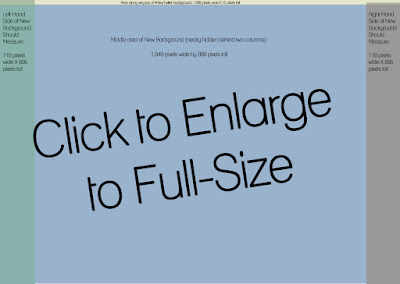
Updated with a pixel-by-pixel breakdown for the #NewTwitter (scroll down for image) and special video with an even more detailed breakdown of this space! If your Twitter profile background was designed to fit Twitter before the #NewTwitter format was introduced, you may need to make some changes to your design.  Your background graphics/photo(s) may look "cut off" in the #NewTwitter.  Why? The #NewTwitter 2-column format takes up more room, leaving less space for your background design. Don't have the time or software to design your own? Not to worry, just stop on over to  Themeleon  and build your own background. The "New Twitter" Background Specs: At 1280 X 1024 screen size (a recommended standard size), here is the breakdown of space: Your new background (overall) should be set up as: 1260 pixels wide X 895 pixels tall Let's break this new background down so you'll know how much room you have in each area: Left-hand side of #NewTwitter background:...

Favorite New Font this Week: Sketch Block Font

Image
Typography has always fascinated me. I admire those designers who are rather brilliant with their use of fonts/colors/etc. to achieve a flawless look. Working on my use of typography has been a goal of mine this year...practice makes perfect (as an aside, I can't wait to unveil an official logo for this blog...long overdue). My favorite font this week is called "Sketch Block", and it's free for your download (as long as it's for personal use). I created the header using this font over on my " Favorite Things This Week" blog , a place where I share things that are inspiring me (hence, "favorite things") at the moment. I am really enjoying the way the Sketch Block font commands your attention but isn't too uptight or boring. It's a font that isn't afraid to get its hands dirty! Here's the look I was able to achieve in my header (thanks to the new font) Hope you enjoy it, too. Laura Tweet