Posts

Showing posts with the label #NewTwitter ~ New Twitter

Brands Doing it Right: New Header Space on Twitter

Image
In my last post , I shared details with you about the new header space on Twitter .   Today I have a few screengrabs to share with you to get your creative juices flowing if you haven’t taken advantage of the new space yet! 1. Real Simple Magazine Love the simple header design, and would expect nothing less from this great brand! Lemons are genius, as is using the magazine cover for their profile pic.   I’d normally shy away from this, but it makes a lot of sense in the new design! 2. Mashable Mashable did something that didn’t occur to most of us – they choose a solid-colored block for their header background.   Of course, it’s no mistake the color is mashable blue.   If your company is known for a signature color, perhaps the header space could be used to reinforce that brand. Or, you could even crop the background from your website to fit this space or go with a simple pattern. 3. National Aquarium I love how The National Aquarium uses the header space to showc...

How to Customize New Header Feature on Twitter

Image
Did you know there is a new feature on Twitter with a rather simple name (called a “header”, seen above) that gives you even more room to customize your Twitter profile page? It launched this week (9/18/2012) and is a great space to further enhance your personal or biz brand! Prominently located on the top right-hand side of your profile page, the header space measures approximately 464 pixels wide by 232 pixels tall.   In other words, significantly larger than your profile photo size (in fact, as wide as your tweets displayed on your profile).   This tutorial is going to walk you through the simple process of customizing your Twitter header.   After all, the more opportunities you have to set yourself apart on Twitter, the better.   How to Customize New Header Feature on Twitter Go to Settings>Design when logged into Twitter. Look for “header” area on right-hand side of “design” page. Upload your header image (the space measures 464 X 232 w...

Video Post: Setting Up Your Background for the New Twitter

Image
Happy "Twitter Tuesday"! I created a YouTube video on creating your very own #NewTwitter background.  This video was inspired by my tutorial post, which continues to be one of my top blog posts.  When Twitter moved to what they call the "New Twitter" or "#NewTwitter" format, the background changed a bit for users.  Although the overall space is the same, you'll find that you have a bit less space on the far left and right hand side of the page.  This is important to note, especially for those of us who placed photographs or text (like a phone number) in this area.  It may be a good idea to take a careful look at your background on Twitter and see if it's in need of some freshening up to better fit the new specs. For those reading by email, the video can be found here: http://www.youtube.com/user/lauracotero#p/u/0/ahGlPoVKTfI All others may wish to watch below.  Thanks for visiting! Laura Catherine Otero is a marketing professional and blogger in...

A #NewTwitter Background Design to Share on this "Twitter Tuesday" Together

Image
It’s “ Twitter Tuesday ” during an incredibly busy holiday week for many of us! My family is no exception, but I still wanted to stop by and share some Twitter goodness with you. I’ve shared a few Twitter background designs with you recently, and wanted to share one I designed today. This one is extra-special to me.  I'll be writing about the reasons why tomorrow in a "Be Inspired Wednesday" post, so please come back for the details. :) This one is for Historic Columbia Foundation. If you visit  the HCF website , you’ll see that the Twitter background is very similar in terms of design. The neat part is how I was able to move things around just a bit to really “fit” well with the #NewTwitter specs. For those who Tweet, please consider following Historic Columbia Foundation http://www.twitter.com/histcolumbia ).  Don't forget to follow me there, too @LauraCatherineO ). Also, as much as I post about Twitter, I’m still learning new things! One of those is tha...

How to Change Your Twitter Background: A "Tutorial Thursday" Post

Image
It's been quite a busy week for us on this blog! If you visited on Tuesday, you noticed that my #NewTwitter background design post was updated with a handy new guide and example for you. I can't say enough about how much fun my first "Be Inspired Wed" spotlight interview with Jescalyn was yesterday. A must-read ( here )! Onto today's post... If you've designed your new background, you may find yourself needing a quick refresher on how to update your twitter background (meaning, now that you've designed a new background, how to you upload the new background to Twitter). Today's " Tutorial Thursday " is short and sweet. Be sure to visit tomorrow for an exciting " Facebook Friday " post. I feel a little silly with my themed days, but they are truly proving to be helpful for me and for you.  Thanks for reading! PS - You may notice the comments on this blog have changed.  I'm testing out  IntenseDebate .  It allows me to reply to in...

New Twitter Background Design Specs (#NewTwitter Background Size)

Image
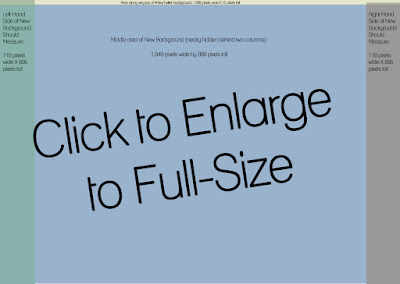
Updated with a pixel-by-pixel breakdown for the #NewTwitter (scroll down for image) and special video with an even more detailed breakdown of this space! If your Twitter profile background was designed to fit Twitter before the #NewTwitter format was introduced, you may need to make some changes to your design.  Your background graphics/photo(s) may look "cut off" in the #NewTwitter.  Why? The #NewTwitter 2-column format takes up more room, leaving less space for your background design. Don't have the time or software to design your own? Not to worry, just stop on over to  Themeleon  and build your own background. The "New Twitter" Background Specs: At 1280 X 1024 screen size (a recommended standard size), here is the breakdown of space: Your new background (overall) should be set up as: 1260 pixels wide X 895 pixels tall Let's break this new background down so you'll know how much room you have in each area: Left-hand side of #NewTwitter background:...