Posts

Showing posts with the label Google Marketing

Google's New "+1" Button

Image
Have you seen the buzz about Google's new "+1" button? It's set to launch in just a few weeks! According to Google, "+1 buttons let people who love your content recommend it on Google search. Once the code is available, you'll be able to add the +1 button to any of your websites and help your pages stand out." Here's a link to an article from Search Engine Land on the "+1 button": http://searchengineland.com/just-weeks-away-a-preview-of-the-google-1-button-for-websites-76628 . Hope you're having a great "Twitter Tuesday"! :) Laura Catherine Otero is a marketing professional and blogger in Charleston , SC who has been active in social media since 2005.  If you enjoyed this post, please consider subscribing to this blog via Email or    RSS . Laura can also be found on Twitter ( @LauraCatherineO ), Facebook , and LinkedIn . 

Have You Created An Online Form/Survey Using Google Docs Yet?

Image
Do you send customer surveys out by mail? - gasp! (smile) or Have you been creating online forms by hand via html? If so, you will find this tutorial on creating an online form / survey using Google Docs to be especially helpful. Before we begin, here is an example of a form I created using Google Docs. I remember when I learned how to create an online form in Dreamweaver. It was quite possibly the most difficult task to master for me. Even now, after a few years of building online forms, I find each time I have to create one, I am slightly overwhelmed and quite honestly, do not enjoy the task at all. I’d heard about Google Docs and even used shared docs in the past, but had never created an online form using Google Docs before. After watching the handy video below (by Google) on how to build such a form, I was ready to go! If you don’t already have a Google account, signing up for one takes just a few minutes and you can use an already existing email address. C...

Great Video on Registering Your Business with Google Local Business Center

I just came across this great video (via @socialnettool) that explains how to register your business with Google Local Business Center. I posted how-to instructions a few weeks ago, and love this video !

How to Register Your Business with Google Local Business Center

Image
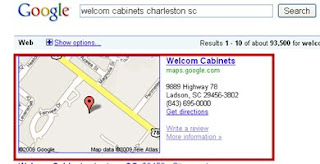
~ Immediately Includes a Link to your business website on Google Maps! ~ More prominence for your website! ~ NO COST! ~ Takes less than 15 minutes start to finish Introduction Many of your future customers are using Google to find your business and make contact with you. Often these searches begin in Google, where the Google search your future customer may type in looks like this: “your company name, Charleston, SC” Whenever a person ties a business name with a city and state, this prompts Google to FIRST display your Google maps business listing. If you haven’t registered your business with Google maps, you are missing out on a great opportunity to quickly drive traffic to your website. You’ll notice below that before registering your website with Google maps, Google will automatically create a link to your physical address instead of your website, and will display that link below your business name instead of your website address. Before registering your website with Google maps, ...