Posts

Hootsuite’s New Auto Scheduling Feature
Image
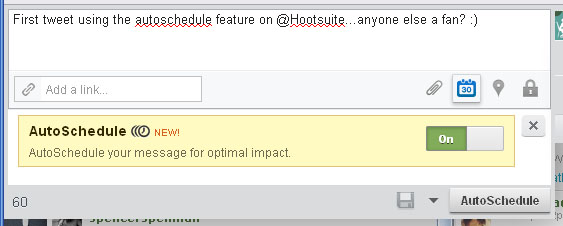
I don’t know about you, but fall is the busiest time of year in our house! That means less time to spend on Twitter, Facebook, my blogs, etc.   That said, there are many tools available online to keep your online presence going when you are running around town or jet setting (smile). Hootsuite has been a longtime favorite of mine…they offered Facebook business page scheduling before Facebook even offered it! I also like that their dashboard allows you to post to Twitter and Facebook at the same time or separately, sending in real-time or scheduling in advance.   Hootsuite has a new feature called AutoScheduling (no space) that I just had to check out for you. Super simple…I’ll break it down for you below. How to Use Hootsuite's AutoScheduling Feature: Compose your tweet or status update as usual. Click on the scheduling icon (it looks like a calendar). Change “off” to “on” in the “AutoScheduling” box. Click “autoschedule”. What happens next? How far apart w...

Five Ways to Customize Your Google+ Profile

Image
You may not be as active on Google+ as you are on Facebook or Twitter, but if you have a career in marketing, advertising, social media or other web-related fields, maintaining a presence on Google+ may be important.   Social Media Examiner reports: When you establish a presence on Google+, build relationships there and get endorsements on the content that you share through Google+, you increase your Google search ranking. Sure, I wish more of my Facebook friends were active on Google+, but I also enjoy that it’s a much calmer place.    It’s also a great place to connect with other social media professionals who I wouldn’t necessarily “friend” on Facebook.   Today I’m sharing a short tutorial on five ways to customize your Google+ profile, including the cover photo space. Five ways to customize your Google+ profile: (all tips accessed via “view profile>edit profile) Keep your profile photo current, professional and inviting . To edit your profile photo, ho...

Brands Doing it Right: New Header Space on Twitter

Image
In my last post , I shared details with you about the new header space on Twitter .   Today I have a few screengrabs to share with you to get your creative juices flowing if you haven’t taken advantage of the new space yet! 1. Real Simple Magazine Love the simple header design, and would expect nothing less from this great brand! Lemons are genius, as is using the magazine cover for their profile pic.   I’d normally shy away from this, but it makes a lot of sense in the new design! 2. Mashable Mashable did something that didn’t occur to most of us – they choose a solid-colored block for their header background.   Of course, it’s no mistake the color is mashable blue.   If your company is known for a signature color, perhaps the header space could be used to reinforce that brand. Or, you could even crop the background from your website to fit this space or go with a simple pattern. 3. National Aquarium I love how The National Aquarium uses the header space to showc...

How to Customize New Header Feature on Twitter

Image
Did you know there is a new feature on Twitter with a rather simple name (called a “header”, seen above) that gives you even more room to customize your Twitter profile page? It launched this week (9/18/2012) and is a great space to further enhance your personal or biz brand! Prominently located on the top right-hand side of your profile page, the header space measures approximately 464 pixels wide by 232 pixels tall.   In other words, significantly larger than your profile photo size (in fact, as wide as your tweets displayed on your profile).   This tutorial is going to walk you through the simple process of customizing your Twitter header.   After all, the more opportunities you have to set yourself apart on Twitter, the better.   How to Customize New Header Feature on Twitter Go to Settings>Design when logged into Twitter. Look for “header” area on right-hand side of “design” page. Upload your header image (the space measures 464 X 232 w...

Twtvite Updated – Sleek New Features

Image
Twtvite has gone through a major update since I used it last.   In fact, I’m so impressed that I wanted to share with you here.   “Twtvite” (pronounced Twit-vite) allows you to easily create and share tweetups with your followers on Twitter (and beyond).   You can create a tweetup on the fly or plan one well in advance.   If you haven't planned a tweetup before, you may want to read this post first. In the past, you could add a logo and small banner to your Twtvite event invitations, but the rest of the invite was pretty generic. I’m sharing a screenshot of the tweetup I just created on their upgraded site, plus details on the upgrades below.   If you’re in Charleston, be sure to join us for the September Charleston Ladies Who Lunch tweetup on 9/14 ( info ). Click photo above for full-size look Twtvite Features I love: Customizable background adds a sleek look – upload your own or use your twitter background.   I matched the backgroun...

How to Earn Klout Perks

Image
I have been a Klout enthusiast for some time now. I can’t help but excited about the freebies that I consistently receive via their complimentary “perks” program. Just today I received a $29 value hard cover photo book from Shutterfly.com as a perk! I’ve also gotten 2 free bottles of wine, a box of business cards, a leather portfolio, $20 in free jewelry and several other freebies in the past 6 months. Did I mention each only took me a few minutes to redeem? And most were totally free?! Here’s how Klout/Klout Perks work: If you haven’t created a Klout account yet, you can do so in a matter of seconds. Simply visit Klout.com and sign in with Twitter or Facebook. Tip: You’ll want to earn “klout” for as many of your social profiles as possible (go to “settings”, then “connect networks”), so be sure to connect Faceboook, Twitter, Google+, Your Blog, Youtube channel, Instagram account and others. Each only takes a minute or two, and it will help you earn a much higher score. Worth the ti...

Where to Find My Summer Posts

Image
Hi Friends! After 12 years of working full-time, I've taken the summer off for some soul-filled rest, adventures, creating and writing (thank you, sweet husband). I'll be posting updates from these heartful efforts over at lauracatherine.co , including Colorado-filled posts and photos! I'm also active on twitter and instagram as @lauracatherineo . Hope you can stop by. xxxo Laura is a marketing professional and blogger who has been active in social media since 2005.  If you enjoyed this post, please consider subscribing to this blog via Email or     RSS . Laura can also be found on Twitter ( @LauraCatherineO ), Facebook , and LinkedIn .